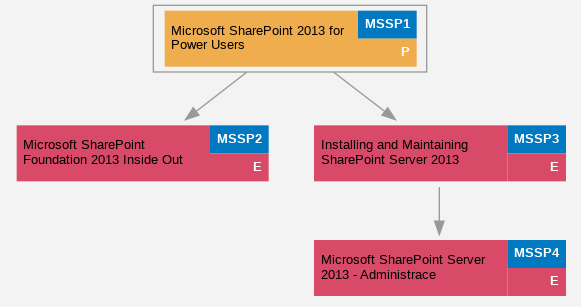
Microsoft SharePoint 2013 for Power Users (MSSP1)
Tento t?ídenní kurz p?ináší SharePoint profesionál?m komplexní pohled na možnosti a scéná?e využití platformy SharePoint z pohledu koncového uživatele, znalosti pot?ebné pro tvorbu nových ?ešení a ?adu praktických doporu?ení a zkušeností, umož?ujících vyt?žit z dané technologie maximum.
Seznámíme se mimo jiné s principy fungování a architekturou SharePoint, zásadami pro tvorbu logické struktury portál? a web?, nástroji a funkcemi pro správu firemního obsahu, s možnostmi využití p?edp?ipravených šablon seznam?, knihoven a web?, tvorbou vlastních šablon a integrací s aplikacemi Microsoft Office.
Autorem kurzu je Kamil Ju?ík, lektor školicího st?ediska PC-DIR a jediný držitel prestižního ocen?ní Microsoft MVP v kategorii SharePoint Server v ?R.
Po absolvování tohoto kurzu získáte:
• Ucelený p?ehled o možnostech využití platformy SharePoint 2013 pro tvorbu praktických ?ešení
• Pochopení princip? práce se stavebními prvky platformy SharePoint, jako jsou weby, seznamy a knihovny
• Jasnou p?edstavu o možnostech tvorby logické struktury SharePoint portál?
• Znalosti a schopnosti pot?ebné pro tvorbu ?ešení pro správu a sdílení obsahu
• P?ehled o možnostech integrace SharePoint web? a aplikací z rodiny Microsoft Office
| Der Kurs ist der Kategorie zugeordnet: |
Aplika?ní a serverové služby → SharePoint Microsoft |
Kursstufe: Fortgeschritten
Course duration: 3 days
Kursinhalt:
- Introducing SharePoint 2013
- • Understanding the purpose of intranet-based collaborative systems and tools
- • SharePoint 2013 benefits and concepts
- • SharePoint 2013 architecture and design Best Practices
- SharePoint Navigation and User Interface Concepts
- • SharePoint Web interface navigation
- • Becoming familiar with the SharePoint ribbon
- • Using SharePoint in multilingual environment
- Portal Architecture Best-Practices
- • Designing logical portal structure using Web Applications, Site Collections and Sites
- • Sites vs. Site Collections
- • Creating Web Applications, Site Collections and Sites
- • Managing Content Databases
- • Using Alternate Access Mappings
- • Out-of-the-box site templates
- SharePoint Lists and Libraries
- • Using out-of-the-box lists and libraries
- • Adding lists and libraries to Sites
- • Adding list & item metadata
- • Creating custom list views
- • Exposing lists and libraries via Web Parts
- • Creating custom site templates
- Records Management
- • Working with Content Types
- • Check-in and check-out process
- • Content approval process
- • Item versioning
- • Recovering deleted content with the Recycle Bin
- Site Mailboxes
- • Site Mailboxes overview (video demonstration)
- • Requirements
- Microsoft Office 2013 integration
- • Setting up alerts and RSS feed
- • Working with SharePoint offline using SkyDrive Pro and Microsoft Outlook 2013
- • Using Office Web Apps
- SharePoint Blogs & Wikis
- • Understanding blogs and wikis
- • Creating and managing wiki content
- • Creating and managing content in blogs using Word 2013 and Live Writer 2012
- Securing SharePoint Content
- • Managing Site Collection Administrators
- • Understanding the out-of-the-box SharePoint groups and permission levels
- • SharePoint security architecture: inheritance and security trimming
- • Managing list & list item permissions
- • Managing inheritance and securing individual items
- Using SharePoint Designer 2013
- • SharePoint Designer 2013 overview
- • Managing list and libraries
- • Managing Content Types and Site Columns
- • Designing & managing workflows with SharePoint Designer 2013
Erforderliche Kenntnisse: Základní p?ehled o platform? Microsoft SharePoint a jejích stavebních prvcích - seznamy, knihovny, weby
Zeitplan: 9:00 - 17:00
.Kurstermine:
Empfohlene vorhergehende und anschlieĂźende Kurse: