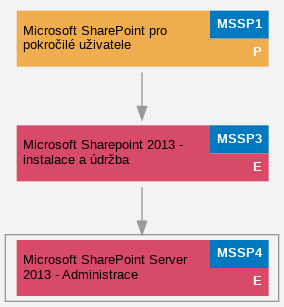
Microsoft SharePoint Server 2013 - Administrace (MSSP4)
Tento intenzivní a na ?eském trhu jedine?ný kurz poskytne IT profesionál?m znalosti a zkušenosti pot?ebné pro správu SharePoint Server 2013 služeb a tvorbu uživatelských ?ešení. B?hem t?í informacemi a cvi?eními nabitých dn? se mimo jiné seznámíte s principy ?len?ní SharePoint obsahu a zásadami jeho zabezpe?ení, tvorbou ?ešení pro správu firemního obsahu a dokument?, nastavením služby pro vyhledávání dat, správou osobních web?, uživatelských profil? a "sociálních funkcí", propojením SharePoint seznam? s externími datovými zdroji a využitím služeb pro vizualizaci dat.
Autorem kurzu je Kamil Ju?ík, lektor školicího st?ediska PC-DIR a jediný držitel prestižního ocen?ní Microsoft MVP v kategorii SharePoint Server v ?R.
Po absolvování tohoto kurzu získáte:
• Informace o možnostech využití SharePoint Server 2013 služeb
• Pochopení zásad správného logického ?len?ní SharePoint obsahu v rámci webových aplikací, kolekcí web? a web?.
• Znalosti a zkušenosti pot?ebné pro tvorbu ?ešení z oblasti správy firemního obsahu.
• Pochopení princip? zabezpe?ení SharePoint obsahu a ?ízení p?ístup?.
• Znalosti a zkušenosti pot?ebné pro nastavení a využití služby pro vyhledávání obsahu, správu osobních web?, uživatelských profil? a "social features", nastavení propojení s externími datovými zdroji a jejich integrace s SharePoint seznamy a knihovnami, možnosti vizualizace Visio výkres? a úprav jednoduchých SharePoint formulá?? v rámci aplikace InfoPath 2013.
| Kurz je zařazen v kategorii: |
Aplika?ní a serverové služby → SharePoint Microsoft |
Náro�nost kurzu: expert
Délka kurzu: 3 dny
Náplň kurzu:
- Doporu?ené zásady logického ?len?ní SharePoint obsahu
- Lekce:
- • Planning Content Databases
- • Site Collections and Sites
- • Site Collection Quotas and Locks Best Practices
- • Site Templates in SharePoint 2013
- Lab:
- • Database Considerations and Best Practices
- • Creating Web applications
- • Creating Site Collections
- • Assigning Site Collection Quotas and Locks
- • Creating Sites and Site Templates
- ?ízení a správa zabezpe?ení a p?ístup? v SharePoint 2013
- Lekce:
- • Managing Site Collection Administrators
- • Web Application User Permission Policies
- • User Permissions and Permission Levels
- Lab:
- • Managing the Farm Administrators Group
- • Managing Site Collection Administrators
- • Creating SharePoint Groups and Custom Permission Levels
- • Assigning User Permissions
- Správa podnikového obsahu
- Lekce:
- • Overview of the Managed Metadata Service
- • Content Types and Site Columns Architecture and Best Practices
- • Information Management Policies
- • Document Sets Features
- • Creating, Collaborating and Using Managed Terms Sets
- • Records Management
- Lab:
- • Setting Up Managed Metadata Service
- • Creating a Content Types Hub
- • Managing Content Types and Site Columns
- • Publishing Content Types
- • Assigning Content Types to List and Libraries
- • SettingUp Information Management Policies
- • Microsoft Office 2013 Integration
- • Working with Managed Term Sets
- • Tagging Items and Documents
- • Records Center
- • Records Management
- Práce s Office Web Apps 2013
- Lekce:
- • Describing User Scenarios
- • Licensing Requirements
- Lab:
- • Using Office Web Apps in Real World Scenarios
- Nastavení a práce s Business Data Connectivity Service
- Lekce:
- • Introduction to the Business Data Connectivity Service
- • External Content Types
- Lab:
- • Setting Up Business Data Connectivity Service Application and Configuring Security with the Secure Store Service
- • Creating External Content Types
- • Creating External lists and External Data Columns
- Konfigurace vyhledávání v SharePoint Server 2013
- Lekce:
- • SharePoint Server 2013 Search Overview
- • SharePoint Search Architecture
- • Federated Search
- • Setting Up Content Sources, Query Rules and Query Suggestions
- Lab:
- • Configuring the Search Service Application
- • Creating Search Center
- • Setting Up Federated Search
- • Setting Up Content Sources, Query Rules and Suggestions
- Nastavení a práce s User Profile Service a Social Features
- Lekce:
- • Overview of User Profiles and Social Networking in SharePoint Server 2013
- • User Profile Service Architecture and Configuration
- • Notes and Tagging
- • Working with My Sites
- • Using Community Sites
- • Task Aggregation
- Lab:
- • Setting Up the User Profile Service Application and My Sites
- • Importing User Profiles from Active Directory
- • Creating My Sites, Configuring My Sites Quotas
- • Creating and using Community Sites
- • Configuring Work Management Service for task aggregation
- Použití Visio Graphics Services
- Lekce:
- • Visio Graphics Services Overview and User Scenarios
- Lab:
- • Setting Up Visio Graphics Service Application
- • Creating End User Solutions
- Dopl?kové funkce a služby
- Lekce a lab:
- • Using PowerShell Sample Scripts
- • SharePoint 2013 3rd Party Solutions and AddOns
PÅ™edpokládané znalosti: Znalosti na úrovni p?edchozího kurzu - Microsoft Sharepoint 2013 - instalace a údržba (MSSP3)
Časový rozvrh: 9:00 - 17:00
.TermÃny kurzu:
Doporu�ené předchozà a návazné kurzy: